> ## Documentation Index
> Fetch the complete documentation index at: https://developer.runa.io/llms.txt
> Use this file to discover all available pages before exploring further.
# Using Push to Card
> Provide faster access to funds for your recipients by pushing funds to cards.
Powered by Visa Direct and Mastercard Send, Runa Push to Card is the fastest and simplest way to send funds directly to your recipients' bank account.
Push to Card facilitates instant transfers to other accounts, powering use cases like gig worker payments, rewards, incentives, insurance claims, corporate rebates, payroll, government aid, and reimbursements.
To get access to Push to Card, please reach out to your Account Manager or
email [support@runa.io](mailto:support@runa.io).
## Fetching the Push to Card products
Retrieve the Push to Card products using the [product list endpoint](/reference/2024-02-05/endpoint/products/list). You can identify these products by the `payout_type` field, which will be set to `payment`. Each Push to Card product supports a specific currency and country. You can refer to the [product listing guide](/features/product-catalog) for more information on this endpoint.
```json title="Push to Card product example, fields truncated for brevity" icon="file" expandable theme={null}
{
"code": "P2C-US",
"name": "Push To Card US",
"currency": "USD",
"state": "LIVE",
"payout_type": "payment",
"is_orderable": true,
"availability": "realtime"
}
```
## Placing a Push to Card order
To make an order for a payment you simply specify the Push to Card product code for the currency and country you wish to send funds in.
For our example, we will be using the `P2C-US` product code for a \$10 payment to a recipient. The payment will be sent to the recipient's email address via the `EMAIL` distribution method.
```http title="Example push to card order" icon="globe" expandable theme={null}
POST https://api.runa.io/v2/order
Content-Type: application/json
X-Api-Key:
{
"payment_method": {
"type": "ACCOUNT_BALANCE",
"currency": "USD"
},
"items": [
{
"face_value": 10,
"distribution_method": {
"type": "EMAIL",
"email_address": ""
},
"products": {
"type": "SINGLE",
"values": ["P2C-US"]
}
}
]
}
```
### Distribution methods
In the example above we used the `EMAIL` distribution method to send the payment to the recipient's email address.
* You can also use the `RECIPIENT` distribution method to send the payment to a known recipient.
* If you want to handle the distribution of the payment link yourself, use the `PAYOUT_LINK` distribution method.
Refer to the [order endpoint reference](/reference/2024-02-05/endpoint/orders/create) for more information on the request schema and other options available.
## Recipient redemption experience
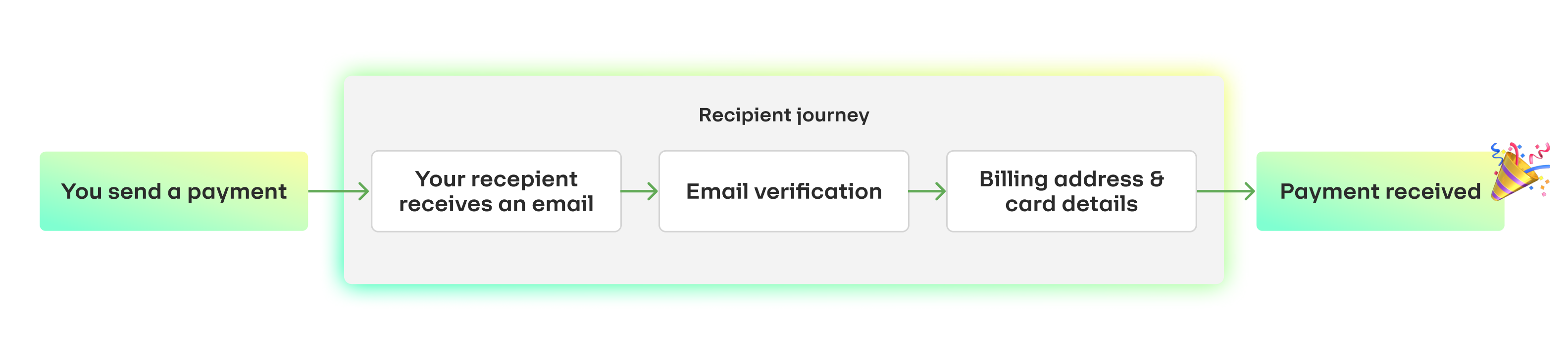
 When a recipient opens the payment link, they will be guided through the following flow on their first redemption:
1. Enter their email address to authenticate
2. Securely enter their card details
3. Receive funds in their bank account
For a returning recipient, they will only need to enter their email address to authenticate. The previously used card details are saved for future redemptions.
## Next steps
Test out the push to card redemption journey in our playground environment.
Read through the potential failure scenarios and suggested resolution for
each.
When a recipient opens the payment link, they will be guided through the following flow on their first redemption:
1. Enter their email address to authenticate
2. Securely enter their card details
3. Receive funds in their bank account
For a returning recipient, they will only need to enter their email address to authenticate. The previously used card details are saved for future redemptions.
## Next steps
Test out the push to card redemption journey in our playground environment.
Read through the potential failure scenarios and suggested resolution for
each.